Tutorial: Using the Codegen Tool

This tutorial covers the executeCesiumCode tool provided by the @cesium-ai/codegen-cesium package. The tool lets users describe what they want to see on the globe in plain English. The backend translates that description into verified CesiumJS JavaScript, which the browser then executes against the live Viewer. This tutorial explains how to use the tool, what you can configure, and how to tune its behaviour.
For a deep-dive into the internal generation pipeline, see the companion How Codegen Works guide.
1. How it works end to end
Type a natural-language intent in the chat panel — for example, "add a polygon over France" or "draw a red point at the Eiffel Tower". Here is what happens:
- The chat panel sends the message to
/api/chat. - The model decides to call
executeCesiumCodeand fills in theintentfield with your request. - Before the backend runs, the browser shows an approval prompt — the raw intent is displayed so you can confirm or reject it.
- On approval, the backend runs the full generation pipeline (domain matching → prompt building → LLM generation → AST verification → optional retry).
- Verified code is streamed back to the browser, which executes it against the live
Viewer.
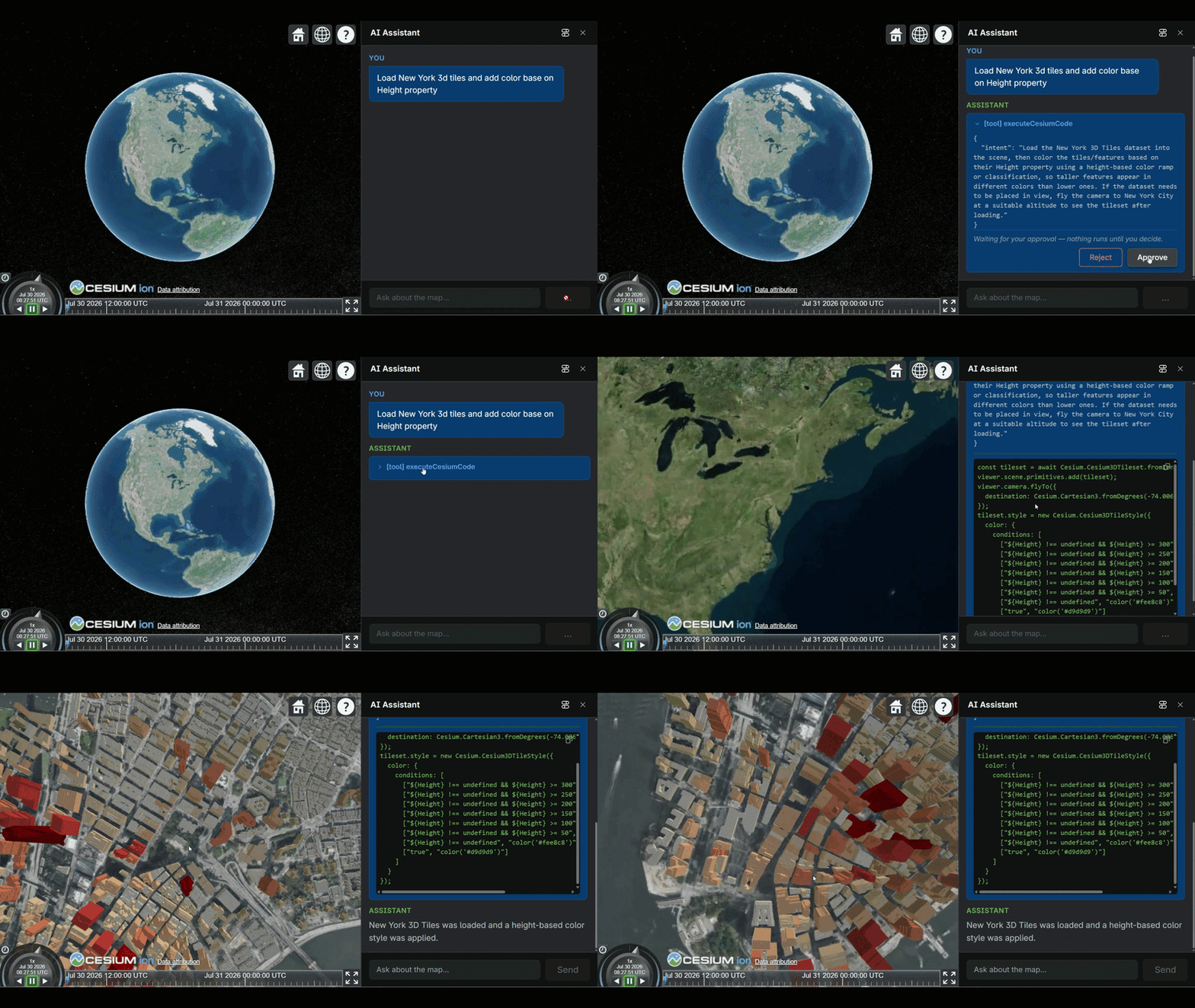
For the full request lifecycle sequence diagram, see Codegen Architecture — Request lifecycle.
2. Enabling the tool
The executeCesiumCode tool is enabled like any other tool in this starter — by adding its name to ENABLED_CESIUM_TOOLS in shared/src/enabled-tools.ts:
// shared/src/enabled-tools.ts
import { CODEGEN_CESIUM_TOOL_NAMES } from "@cesium-ai/codegen-cesium/names";

export const ENABLED_CESIUM_TOOLS = [
  CESIUM_TOOL_NAMES.flyTo,
  CODEGEN_CESIUM_TOOL_NAMES.executeCesiumCode, // ← add
] as const satisfies readonly (CesiumToolName | CodegenCesiumToolName)[];
The backend also requires a model to be configured — at least one of OPENAI_API_KEY,
ANTHROPIC_API_KEY, or GOOGLE_GENERATIVE_AI_API_KEY must be set. If no model is available,
executeCesiumCode is silently omitted from the registry even if listed in ENABLED_CESIUM_TOOLS.
To disable the tool, remove its name from the array. The backend immediately stops registering it and the frontend gate rejects any stale call.
3. Human-in-the-loop approval
executeCesiumCode runs with toolApproval: "user-approval". Before the backend generates any code, the browser shows the raw intent string and waits for an
explicit click. This approval step exists because code generation is irreversible from the model's
perspective — once the LLM runs, tokens are spent and code may be applied to the live globe.
The approval check is wired in backend/src/app.ts:
// backend/src/app.ts (simplified)
const toolApproval = {
  [CODEGEN_CESIUM_TOOL_NAMES.executeCesiumCode]: "user-approval",
};
If the user rejects, the agent loop receives a rejection result and may ask the user to clarify or abandon the request. No code is generated or executed.
4. Configuration options
Environment variables
These are validated through Zod in backend/src/utils/env.ts and read at startup.
| Variable | Default | Description |
|---|---|---|
CODEGEN_MAX_SKILLS |
1 |
Number of top BM25-matched skill domains injected into the generation prompt as context. Increasing this gives the model broader CesiumJS API coverage at the cost of a larger prompt. |
CODEGEN_MAX_ATTEMPTS |
3 |
How many times to retry generation if AST verification fails. Each retry feeds the violation list back to the model as a correction prompt. |
CODEGEN_MAX_CODE_LENGTH |
4000 |
Maximum generated source length (characters) allowed by static verification (verifyCesiumCode maxLength). |
CODEGEN_MAX_CODE_LINES |
100 |
Maximum generated line count allowed by static verification (verifyCesiumCode maxLines). |
CODEGEN_ALLOWED_SYMBOLS |
(unset) | Optional comma-separated free-identifier allowlist passed to static verification (verifyCesiumCode allowedSymbols). Leave unset to disable allowlist enforcement. |
CODEGEN_EXTRA_INSTRUCTIONS |
(unset) | Optional operator-supplied instructions appended to the generation prompt output rules (for app-specific constraints or style preferences). |
Set them in your .env file:
CODEGEN_MAX_SKILLS=2
CODEGEN_MAX_ATTEMPTS=5
CODEGEN_MAX_CODE_LENGTH=6000
CODEGEN_MAX_CODE_LINES=140
CODEGEN_ALLOWED_SYMBOLS=viewer,Cesium,scene
CODEGEN_EXTRA_INSTRUCTIONS=Prefer deterministic output and avoid unnecessary comments.
Programmatic options
createExecuteCesiumCodeTool (used in backend/src/app.ts) accepts the same options
programmatically, letting you override env defaults without changing environment configuration:
// backend/src/app.ts
import { createExecuteCesiumCodeTool } from "./tools/execute-cesium-code-tool";

const executeCesiumCodeTool = createExecuteCesiumCodeTool({
  model,
  maxSkills: 2, // override CODEGEN_MAX_SKILLS
  maxAttempts: 5, // override CODEGEN_MAX_ATTEMPTS
  maxLength: 6000, // override CODEGEN_MAX_CODE_LENGTH
  maxLines: 140, // override CODEGEN_MAX_CODE_LINES
  allowedSymbols: ["viewer", "Cesium", "scene"], // override CODEGEN_ALLOWED_SYMBOLS
  extraInstructions: "Prefer deterministic output and avoid unnecessary comments.", // override CODEGEN_EXTRA_INSTRUCTIONS
});
The function signature for the underlying pipeline entry point is:
generateVerifiedCesiumCode({
  intent: string, // natural-language description from the user
  model: LanguageModel, // AI SDK LanguageModel — caller supplies this
  maxSkills?: number, // default 1
  maxAttempts?: number, // default 3
  maxLength?: number, // default 4000
  maxLines?: number, // default 100
  allowedSymbols?: readonly string[], // default unset
  extraInstructions?: string, // default unset
}): Promise<{ verified: true; code: string } | { verified: false; error: string; violations?: string[] }>
5. AST verifier rules
The verifier (verifyCesiumCode in packages/codegen-cesium/src/pipeline/ast-verifier.ts)
runs parse-only static analysis — it never executes the candidate code. All violations
are collected before the result is returned, so a single failing code block reports every
problem at once.
Size limits
| Limit | Default | Override |
|---|---|---|
| Maximum source length | 4 000 characters | options.maxLength |
| Maximum line count | 100 lines | options.maxLines |
Parse check
The code is parsed with acorn (ecmaVersion: "latest", sourceType: "script"). A parse
error is a violation. If parsing fails entirely, remaining checks are skipped.
Banned constructs
| Construct | Why |
|---|---|
eval(...) / bare eval reference |
Dynamic code execution |
Function(...) / new Function(...) / bare Function reference |
Dynamic code execution |
Dynamic import(...) |
Dynamic module loading |
Computed member access obj[expr] |
Bypasses static API allowlists |
Banned browser globals
The following identifiers are rejected whether referenced directly or as the root of a member
chain (e.g., window.fetch is also rejected):
fetch · XMLHttpRequest · WebSocket · window · document · localStorage ·
sessionStorage · indexedDB · navigator · Worker · SharedWorker · postMessage
Free-identifier allowlist (optional)
verifyCesiumCode accepts an optional allowedSymbols set. When provided, any free identifier
not in the set and not in the built-in safe globals list (Math, console, Array, Object,
etc.) is a violation. The default pipeline does not pass allowedSymbols, so only the
denylist above is enforced. To enable positive allowlisting, call the verifier directly:
import { verifyCesiumCode } from "@cesium-ai/codegen-cesium";

const result = verifyCesiumCode(code, {
  allowedSymbols: new Set(["viewer", "Cesium", "scene"]),
});
Unbounded loop heuristic
while (true) { }, for (;;) { }, and do { } while (true) are rejected if the loop body
contains no break statement anywhere in its subtree. This is a heuristic — it prevents the
most obvious infinite loops but is not a termination proof.
6. How results flow back to the browser
The tool's execute handler in backend/src/tools/execute-cesium-code-tool.ts returns either:
{
  code: string;
} // generation succeeded and passed verification
{
  error: string;
} // generation failed or all retries were exhausted
The browser receives this as a tool result in the SSE stream. The starter app validates the
result shape and then executes the verified code after user approval, isolated inside a
fresh QuickJS-wasm interpreter provided by
@cesium-ai/codegen-sandbox
(see the Security Considerations document for
the full sandbox architecture).
7. Quick reference
| I want to… | Where to look |
|---|---|
| Enable the tool | shared/src/enabled-tools.ts — add CODEGEN_CESIUM_TOOL_NAMES.executeCesiumCode |
| Disable the tool | Same file — remove the name |
| Change the number of skills in the prompt | CODEGEN_MAX_SKILLS env var or maxSkills in createExecuteCesiumCodeTool |
| Change how many retries are allowed | CODEGEN_MAX_ATTEMPTS env var or maxAttempts in createExecuteCesiumCodeTool |
| Change max generated source length | CODEGEN_MAX_CODE_LENGTH env var or maxLength in createExecuteCesiumCodeTool |
| Change max generated line count | CODEGEN_MAX_CODE_LINES env var or maxLines in createExecuteCesiumCodeTool |
| Restrict free identifiers | CODEGEN_ALLOWED_SYMBOLS env var or allowedSymbols in createExecuteCesiumCodeTool |
| Append operator prompt rules | CODEGEN_EXTRA_INSTRUCTIONS env var or extraInstructions in createExecuteCesiumCodeTool |
| Understand how the pipeline works | How Codegen Works |
| Review the security threat model | Security Considerations |
| Understand the architecture | Codegen Architecture |