Tutorial: Using and Extending CesiumJS Viewer Tools
This guide covers how to enable, wire up, and disable tools from the
@cesium-ai/tools-schemas library in this starter app. The library ships
a catalogue of ready-made CesiumJS tools; you pick which ones your app exposes
by configuring a couple of app-layer files — the library itself is never touched.
1. How flyTo tool works
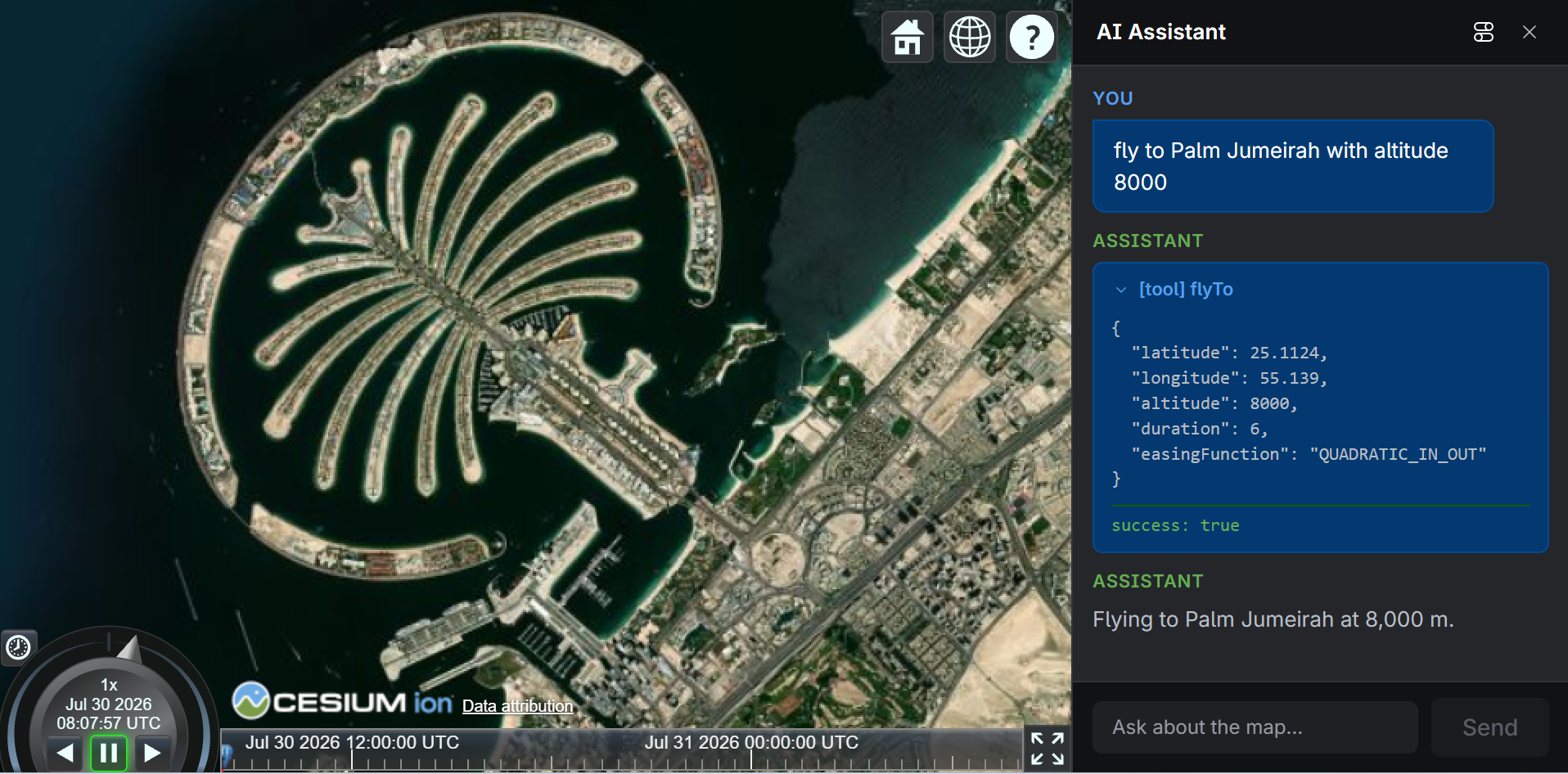
The starter app ships with one tool already wired up end to end: flyTo.
Type something like "fly to Paris" in the chat panel and the camera animates
there — the assistant confirms on arrival.
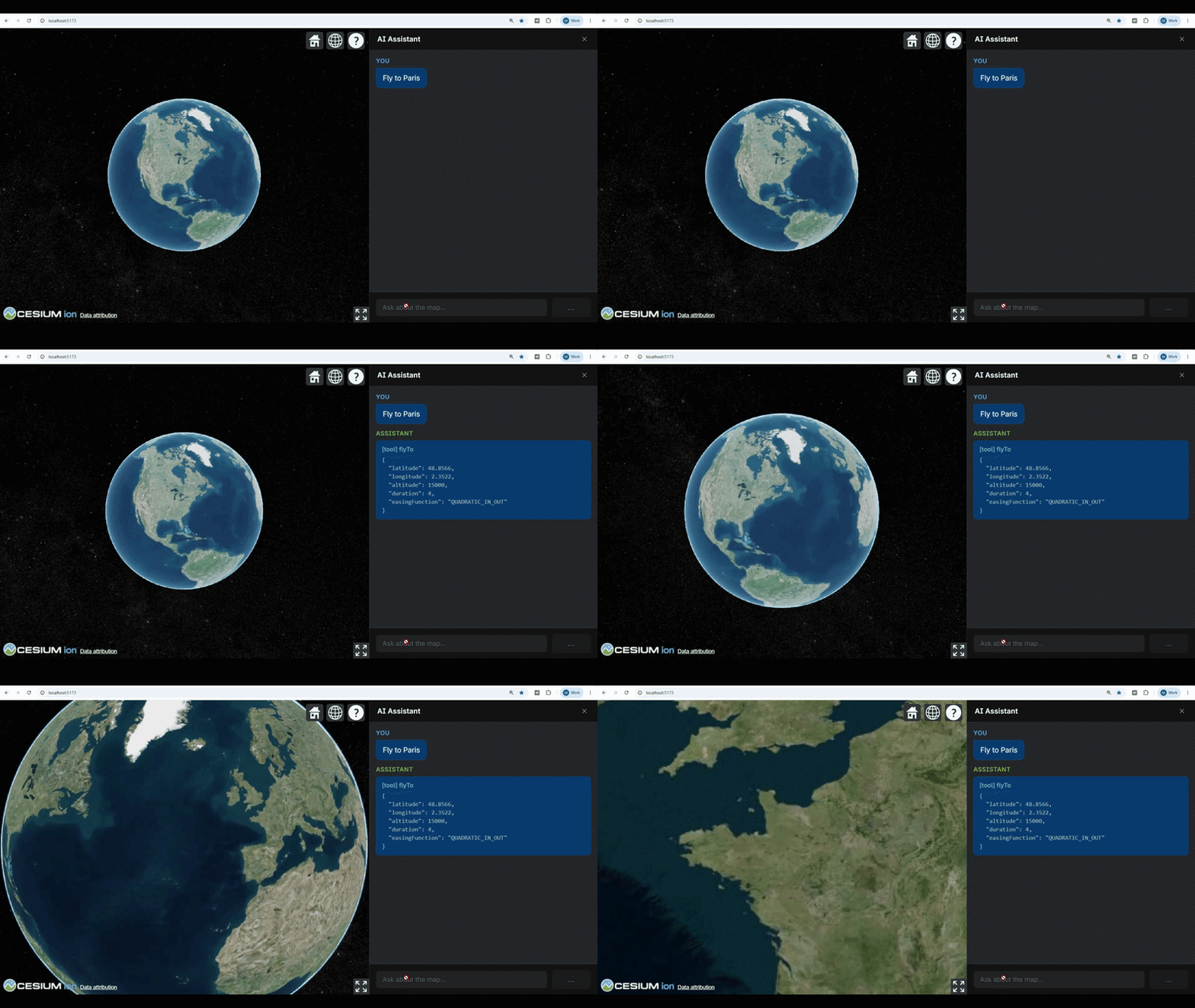
Here is what happens step by step:
- User types a message. The chat panel sends it to the backend's
/api/chatendpoint over a Server-Sent Events stream. - The model decides to call
flyTo. It produces a JSON object matching the tool's Zod schema —latitude,longitude,altitude, optionallydurationandeasingFunction. - The server streams the tool call to the browser. It never executes
anything — the server has no
Viewer. ChatPanel.tsxreceivesonToolCall("flyTo", args). It checks that"flyTo"is in theENABLED_TOOLSset fromfrontend/src/tools/cesium-tool-executors.ts(defense-in-depth), then dispatches to that same module'sTOOL_EXECUTORSmap, which delegatesflyTotoflyToLocationinfrontend/src/tools/camera.ts— re-validatingargsagainst the structural schema before it ever touches theViewer.- The executor returns a result. The chat panel posts it back so the model can confirm the flight finished.
%%{init: {"themeVariables": {"fontSize": "20px"}, "flowchart": {"nodeSpacing": 50, "rankSpacing": 70, "padding": 15}}}%%
flowchart LR
    subgraph Browser
        User
        Viewer["CesiumJS Viewer"]
        Chat["Chat panel\n(ChatPanel.tsx)"]
    end

    subgraph Server
        Agent["Agent loop\n(streamText)"]
        Registry["Tool registry\n(schemas + descriptions only)"]
    end

    User -- "fly to Paris" --> Chat
    Chat <-- "SSE stream" --> Agent
    Agent -- "tool call: flyTo + args" --> Chat
    Chat -- "flyToLocation(viewer, args)" --> Viewer
    Viewer -- "result" --> Chat
Chat -- "tool result" --> AgentThe files wired end to end
Six files make flyTo work. Each has one clearly scoped responsibility:
| File | Tier | What it does |
|---|---|---|
shared/src/tools/flyto-schema.ts |
Shared | Defines flyToShape — the structural args contract (lat/lon/altitude + duration/easingFunction). No description text. Imported by both sides. |
backend/src/tools/flyto-tool.ts |
Backend | Layers .describe() hints onto flyToShape to produce the model-facing schema. Never reaches the client bundle. |
backend/src/app.ts |
Backend | Wires the tool into the AI SDK registry via createCesiumTools({ enabled: ENABLED_CESIUM_TOOLS, flyTo: { inputSchema } }). |
frontend/src/tools/camera.ts |
Frontend | Builds flyToLocation from @cesium-ai/tools's createFlyToExecutor factory — validates rawArgs against flyToShape, then calls viewer.camera.flyTo(…) with the extra duration/easingFunction options. Returns { success } once the animation completes. |
frontend/src/tools/cesium-tool-executors.ts |
Frontend | TOOL_EXECUTORS — @cesium-ai/tools's default executor for every catalogue tool, with flyTo overridden by flyToLocation. ENABLED_TOOLS — the runtime allowlist Set built from ENABLED_CESIUM_TOOLS. |
frontend/src/components/ChatPanel.tsx |
Frontend | onToolCall checks the incoming tool name against ENABLED_TOOLS, then dispatches to the matching entry in TOOL_EXECUTORS. |
The shared shape (flyToShape in shared/) is the single contract both sides
agree on. The backend adds descriptions on top; the frontend validates against
the structure — neither side redefines the rules.
2. Why schema and description are separated
Every viewer tool is split into two layers. Understanding why makes it easier to know which file to edit.
The structural shape — schemas.ts
packages/tools-schemas/src/schemas.ts
holds the args contract: field names, types, min/max ranges, optional vs.
required. This is a plain Zod object shape with no natural-language text.
// packages/tools-schemas/src/schemas.ts (simplified)
export const flyToInputShape = z.object({
  latitude: z.number().min(-90).max(90),
  longitude: z.number().min(-180).max(180),
  altitude: z.number().positive().optional(),
});
The frontend imports this shape directly (via the /schemas subpath) to
validate untrusted args before touching the Viewer. The backend derives its
model-facing schema from it, layering natural-language hints on top.
The model-facing hints — flyTo.ts
packages/tools-schemas/src/tools/flyTo/flyTo.ts
holds the human-readable text the LLM reads: the tool description and
per-field .describe() calls.
// packages/tools-schemas/src/tools/flyTo/flyTo.ts (simplified)
export const DEFAULT_FLY_TO_DESCRIPTION =
  "Fly the camera to a geographic location with an animated transition.";

export const DEFAULT_FLY_TO_FIELD_DESCRIPTIONS = {
  latitude: "Decimal degrees, −90 to 90. North is positive.",
  longitude: "Decimal degrees, −180 to 180. East is positive.",
  // …
};
buildFlyToInputSchema then calls flyToInputShape.shape.*.describe(…) to
produce the model-facing Zod schema — it layers the text onto the structural
rules without redefining them.
Why keep them separate?
| Concern | Layer | Who imports it |
|---|---|---|
| Args contract — field names, types, ranges, required/optional | schemas.ts structural shape |
Both backend and frontend |
Model-facing hints — description, .describe() text the LLM reads |
flyTo.ts full definition |
Backend only |
Tool descriptions are prompt material — potentially long, and something you may iterate on without touching validation logic. More importantly, they must never ship to the browser bundle: they are internal guidance for the LLM, not user-facing copy, and bundling them would increase client size for no user benefit.
This separation also gives the design two security properties:
- AI-generated args are treated as untrusted input. The model's tool-call
payload is arbitrary JSON.
flyToLocation(and every executor) re-validates it against the structural Zod shape before touching theViewer— a malformed or out-of-range payload is rejected with an error result instead of crashing the globe. - Double allowlist gate prevents stale or spoofed tool calls from executing.
The backend's
createCesiumTools({ enabled: ENABLED_CESIUM_TOOLS })limits what the model is even offered, so a disabled tool is never called under normal operation. The frontend'sENABLED_TOOLSset infrontend/src/tools/cesium-tool-executors.ts, checked byChatPanel.tsx'sonToolCall, enforces the same allowlist a second time — an unexpected tool name (disabled, renamed, or injected via a prompt-injection attack) is rejected beforeTOOL_EXECUTORSis consulted, so no tool call can drive the liveViewerunless it is explicitly enabled on both sides.
The package therefore exposes three subpaths:
| Subpath | Exports | Who imports it |
|---|---|---|
@cesium-ai/tools-schemas |
Full definitions incl. descriptions | Backend only. Never import from client code. |
@cesium-ai/tools-schemas/names |
CESIUM_TOOL_NAMES, CesiumToolName |
Both sides. String constants only. |
@cesium-ai/tools-schemas/schemas |
<toolName>InputShape, inferred types |
Both sides. Structural shapes, no descriptions. |
A contract change — e.g. tightening the lat/lon ranges — is a single edit to
the structural shape in schemas.ts that both tiers pick up automatically. A
description tweak is a single edit to flyTo.ts that only the backend sees.
3. Updating descriptions
Because descriptions live only on the backend, you can change them without touching the frontend or the shared schema.
Update the tool description
The tool description is the sentence the model reads to decide when to call
flyTo. Pass a description override to createCesiumTools in
backend/src/app.ts:
// backend/src/app.ts
createCesiumTools({
  flyTo: {
    description: "Navigate the 3D globe camera to any named place on Earth.",
    inputSchema: flyToInputSchema,
  },
});
Omitting description keeps the default from
packages/tools-schemas/src/tools/flyTo/flyTo.ts
(DEFAULT_FLY_TO_DESCRIPTION).
Update individual field descriptions
Per-field hints tell the model what each argument means. They are defined in
backend/src/tools/flyto-tool.ts
as DEFAULT_FLY_TO_EXTENSION_DESCRIPTIONS — a plain object spread over the
library defaults, where each key matches a field name:
// backend/src/tools/flyto-tool.ts
const DEFAULT_FLY_TO_EXTENSION_DESCRIPTIONS = {
  ...DEFAULT_FLY_TO_FIELD_DESCRIPTIONS,
  duration: "Flight duration in seconds. Omit to let Cesium pick a distance-based default.",
  easingFunction: "Named easing curve applied to the flight. Omit for Cesium's default.",
};
Edit the string for whichever field you want to change. The base field hints
(latitude, longitude, altitude) come from DEFAULT_FLY_TO_FIELD_DESCRIPTIONS
exported by @cesium-ai/tools-schemas — override any of them by adding the key
explicitly:
const DEFAULT_FLY_TO_EXTENSION_DESCRIPTIONS = {
  ...DEFAULT_FLY_TO_FIELD_DESCRIPTIONS,
  latitude: "Destination latitude in decimal degrees. Positive values are north.", // ← override
  duration: "Flight duration in seconds. Omit to let Cesium pick a distance-based default.",
  easingFunction: "Named easing curve applied to the flight. Omit for Cesium's default.",
};
Both the tool description and field descriptions are backend-only — changes never affect the client bundle or the validated args contract.
4. Extending a tool's input schema
Sometimes you want the model to accept fields the base schema doesn't include.
flyTo is the example in this starter: the library's flyToInputShape covers
latitude, longitude, and altitude, but this app also wants duration and
easingFunction.
The pattern is to extend the base shape in
shared/src/tools/
and use the extended shape in both the executor and the backend's tool
configuration:
// shared/src/tools/flyto-schema.ts  (already exists — shown for reference)
import { z } from "zod";
import { flyToInputShape } from "@cesium-ai/tools-schemas/schemas";

export const flyToShape = z.object({
  ...flyToInputShape.shape,
  duration: z.number().positive().optional(),
  easingFunction: z.enum(EASING_FUNCTION_NAMES).optional(),
});
The extended shape stays in shared/ so both the backend (adds descriptions on
top in
backend/src/tools/flyto-tool.ts)
and the frontend executor (validates the raw args in
frontend/src/tools/camera.ts)
import the same structural contract without the descriptions.
Only extend when the base schema genuinely doesn't cover what you need. For most
tools the base <toolName>InputShape from /schemas is sufficient — import and
use it directly in the executor.
5. Available tools
The full tool catalogue is documented in the
Tool Catalogue reference page, which lists
every tool name and what it does. All tools are defined in
packages/tools-schemas/src/
and can be enabled in the starter app by following Section 6.
6. Enabling a tool
Every viewer tool in @cesium-ai/tools-schemas's CESIUM_TOOL_NAMES catalogue
is already enabled in this app by default —
shared/src/enabled-tools.ts's
ENABLED_CESIUM_TOOLS spreads Object.values(CESIUM_TOOL_NAMES) directly, and
every one of those tools already has a ready-to-use client-side executor via
@cesium-ai/tools's createCesiumToolExecutors(), wired up in
frontend/src/tools/cesium-tool-executors.ts.
Configuring an explicit set of enabled tools
To curate this app's surface instead of exposing the whole catalogue, replace
the spread in shared/src/enabled-tools.ts with an explicit list and add a
name to turn that tool on:
// shared/src/enabled-tools.ts
export const ENABLED_CESIUM_TOOLS = [
  CESIUM_TOOL_NAMES.flyTo,
  CESIUM_TOOL_NAMES.entityAdd, // ← add
  CESIUM_TOOL_NAMES.cameraOrbit,
] as const satisfies readonly CesiumToolName[];
The satisfies constraint catches typos at compile time — every entry is
checked against CesiumToolName from @cesium-ai/tools-schemas/names, so a
name that isn't a real tool fails to build.
Both tiers derive from this one array:
- Backend —
backend/src/app.tspasses it tocreateCesiumTools({ enabled: ENABLED_CESIUM_TOOLS }), so the model is only ever offered tools in this list. - Frontend —
frontend/src/tools/cesium-tool-executors.tsbuilds a runtimeENABLED_TOOLSset from the same array, checked byChatPanel.tsx'sonToolCallbefore a tool call ever reaches theViewer.
Rebuild the packages (npm run build:packages) and re-run the allowlist test
(npm test -- enabled-tools) after changing the list.
Removing a tool
Remove the tool's name from ENABLED_CESIUM_TOOLS in the same file — whether
you're editing an explicit list (above) or filtering it out of the "every
catalogue tool" default:
// shared/src/enabled-tools.ts
export const ENABLED_CESIUM_TOOLS = [
  ...(Object.values(CESIUM_TOOL_NAMES) as CesiumToolName[]).filter(
    (name) => name !== CESIUM_TOOL_NAMES.imageryAdd, // ← removed
  ),
] as const satisfies readonly CesiumToolName[];
The removal propagates automatically to both tiers on the next build: the
backend no longer registers the tool, and the frontend's ENABLED_TOOLS gate
rejects any call to it even if one somehow arrives.
createCesiumTools also accepts false for any per-tool key, which drops a
tool from the backend registry independently of the enabled allowlist —
useful for suppressing one tool without touching the shared config. Note this
alone doesn't update the frontend's ENABLED_TOOLS gate, so for a complete
disable on both tiers, remove the name from ENABLED_CESIUM_TOOLS instead:
// backend/src/app.ts
createCesiumTools({
  flyTo: false, // ← excluded from this backend's registry only
});
Overriding a tool's execution
Sometimes you don't want to turn a tool on or off — you want to change how it
behaves for this app, without forking it. flyTo is the worked example
already covered above (Sections 1 and 4): its accepted shape is extended with
duration/easingFunction in
shared/src/tools/flyto-schema.ts,
and its client-side executor is overridden in
frontend/src/tools/cesium-tool-executors.ts:
// frontend/src/tools/cesium-tool-executors.ts
export const TOOL_EXECUTORS: Record<EnabledCesiumTool, ToolExecutor> = {
  ...createCesiumToolExecutors({ flyTo: flyToLocation }),
};
Every other tool keeps @cesium-ai/tools's default untouched. See
packages/tools/README.md
for the full set of override/extend patterns — a full override works for any
tool, and narrower createXExecutor factories are also available for flyTo,
cameraSetView, and every entityAdd* variant.
7. Quick reference
| I want to… | Edit |
|---|---|
| Add a tool to this app's enabled set | shared/src/enabled-tools.ts — add the name to ENABLED_CESIUM_TOOLS |
| Remove a tool from this app | Same file — filter or remove the name from ENABLED_CESIUM_TOOLS |
| Override how a tool runs in the browser | frontend/src/tools/cesium-tool-executors.ts — pass an override to createCesiumToolExecutors |
| Extend a tool's input schema with new fields | shared/src/tools/<toolName>-schema.ts — spread the base shape and add fields |
| Add guidance to the system prompt | packages/server/src/agent.ts — extend DEFAULT_SYSTEM_PROMPT |
| See what tools the library offers | Tool Catalogue or packages/tools-schemas/src/ |