Architecture
This document explains how the CesiumJS AI starter app is put together: its high-level component architecture, the request/response sequence for a tool-calling chat turn.
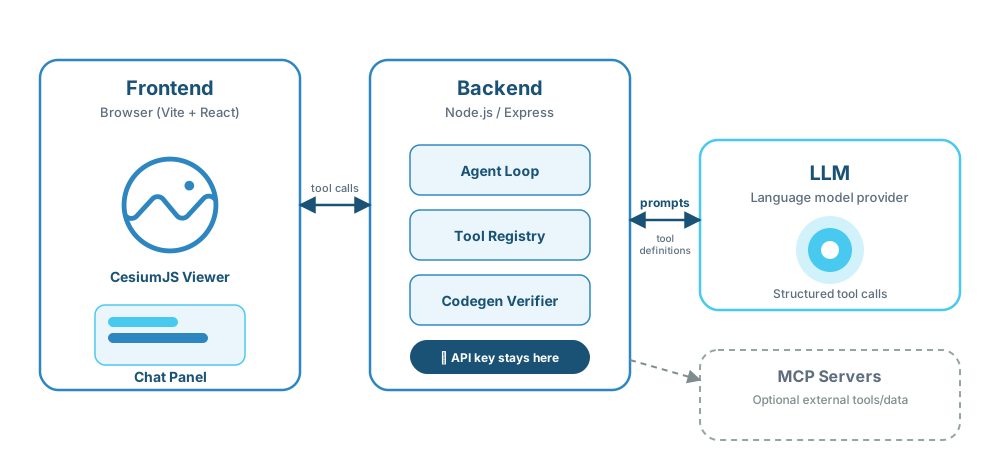
1. Component overview
%%{init: {"themeVariables": {"fontSize": "20px"}, "flowchart": {"nodeSpacing": 50, "rankSpacing": 70, "padding": 15}}}%%
flowchart LR
    subgraph BrowserSide["Browser"]
        Viewer["CesiumJS Viewer"]
        Chat["Chat Panel"]
    end

    subgraph ServerSide["Server"]
        API["Node.js API<br/>/api/chat"]
        Agent["Agent loop (streamText)"]
        Registry["Tool registry"]
    end

    Chat -- "onToolCall" --> API
    API -- "SSE" --> Chat
    Viewer -- "Viewer tool results" --> Chat
    API --> Agent
    Agent --> Registry
API -. "MCP / LLM API key (server only)" .-> AgentSplit-execution model: viewer tools (camera navigation, entity manipulation) are
streamed via Server-Sent Events to the browser and executed there, against the live Viewer instance. Any future
MCP-backed tools would run entirely server-side and never stream as client tool calls. The
LLM API key never reaches the browser — all inference happens behind the Node.js API.
Why split execution this way?
CesiumJS must run in the browser:
- CesiumJS's
Vieweronly exists in the browser (WebGL context, DOM canvas) — there's nothing for the server to execute against.
Server-side logic protects against several classes of vulnerability:
- API key exposure — keeping the LLM API key and any MCP credentials server-side means the client bundle never carries a secret that could be extracted from DevTools or a network trace and abused by a third party.
- Prompt injection (OWASP LLM01)
& tool poisoning (OWASP MCP Tool Poisoning)
— tool
descriptions (the natural-language hints the LLM reads to decide which tool to call)
are constructed server-side and never passed through untrusted user input. If
descriptions were rendered on the client and echoed back, a crafted message could hijack
tool selection. A related attack — tool poisoning — embeds adversarial instructions
inside a tool's
nameordescriptionfield to manipulate the model's behaviour without the user's knowledge; keeping the tool registry server-only prevents a compromised client from injecting or replacing tool definitions. Seedocs/packages/index.mdfor how@cesium-ai/tools-schemassplits its exports to enforce that boundary at the module level. - CORS restrictions on MCP servers — most MCP servers do not set permissive
Access-Control-Allow-Originheaders, so browserfetchcalls to them are blocked by the browser's same-origin policy. Routing all MCP traffic through the Node.js backend sidesteps this entirely; the server-to-MCP call is a plain HTTP/WebSocket request with no origin restrictions. - Tool schema leakage — exposing the full tool registry (names, parameter shapes, descriptions) to the browser gives an attacker the reconnaissance needed to craft effective prompt-injection and tool-poisoning attacks (see bullets above). Keeping schemas server-side removes that advantage.
2. Sequence diagram — a tool-calling chat turn
The following shows what happens end to end when a user types "fly to Paris".
%%{init: {"themeVariables": {"fontSize": "16px"}, "sequence": {"actorFontSize": 16, "messageFontSize": 15, "noteFontSize": 14, "actorMargin": 60, "boxMargin": 10, "diagramMarginX": 30, "diagramMarginY": 15}}}%%
sequenceDiagram
    actor User
    participant UI as Chat Panel (React)
    participant Viewer as CesiumJS Viewer
    participant API as Backend /api/chat<br/>(@cesium-ai/server)
    participant Agent as Agent loop<br/>(streamText)
    participant LLM as LLM Provider<br/>(OpenAI/Anthropic/Google)

    User->>UI: types "fly to Paris" and sends
    UI->>API: POST /api/chat (messages, streamed)
    API->>API: validate request (maxMessages, rate limit)
    API->>Agent: runAgent({ messages, model, tools })
    Agent->>LLM: streamText(system, messages, tools=[flyTo,...])
    LLM-->>Agent: tool call: flyTo({ latitude, longitude, altitude })
    Agent-->>API: stream tool-call event
    API-->>UI: SSE: tool-call (name="flyTo", args)
    UI->>UI: onToolCall("flyTo", args)
    UI->>UI: re-validate args against flyToInputShape
    UI->>Viewer: viewer.camera.flyTo(destination, ...)
    Viewer-->>UI: flight complete
    UI-->>API: tool result ({ success: true })
    API->>Agent: continue agent loop with tool result
    Agent->>LLM: streamText(... + tool result)
    LLM-->>Agent: final assistant message ("Flying to Paris... done.")
    Agent-->>API: stream text tokens
    API-->>UI: SSE: text tokens
UI-->>User: renders assistant confirmationKey points this diagram makes explicit:
- The args the model produced are untrusted until the client re-validates them against
the schema-only shape (
flyToInputShape) — never trust that the server accepted a value as safe to feed toViewer.camera.flyTo. - The agent loop is iterative:
stopWhen: stepCountIs(maxSteps)bounds how many model-call ⇄ tool-call round trips a single request can make (default5— seeDEFAULT_MAX_STEPSin@cesium-ai/server). - Everything left of
Backend /api/chatruns in the browser; everything right of it runs on the Node.js server. The LLM provider is only ever called server-side.
Related documents
- Getting Started — install and run the app.
- Packages — what each workspace package is responsible for.
- Cesium Viewer Tools Tutorial — how the viewer tool system works, and how to add/remove a tool.
- MCP Support Architecture — how optional MCP (Model Context Protocol) tool servers are wired in.